spaCy: When You Need Structure, Not Just Vectors, Part II

Updated: May 2
This is the direct continuation of the previous post on spaCy. In this post we are looking at custom pipelines, custom models, and how to usefully combine spaCy and Gensim.
Custom Pipelines: Adding Your Own Logic
The nlp pipeline is composable. So we can not just toggle off some components of the pipeline, we can also insert custom components.
Custom components run in sequence with the built-in ones. This is the place to add business logic, external API calls, rule-based labels, model predictions, or document-level metadata.
One small practical improvement: use force=True if you are working in a notebook and may run the cell more than once.
Without force=True, spaCy raises an error if the extension already exists. In scripts, that error is helpful, but in notebooks, it is often just annoying.
In most cases the exact position where the new components will be important:
If the component needs named entities, it must run after ner. If it needs dependencies, it must run after parser. But if it only needs raw tokens, then it can run early.
A more realistic custom component might flag documents containing risk language:
That is not sophisticated sentiment analysis, but it is useful. Many production NLP systems are a collection of small, transparent enrichments like this. This makes them easy to debug and maintain.
You can inspect the final pipeline:
And of course, custom components can be disabled in the same way that built-in ones are.
The architecture: Components are functions that take a Doc and return a Doc. They can modify tokens, add annotations, or set custom attributes. The pipeline is just a list of these functions.
When this is worth having: If you need to enrich documents with metadata — sentiment scores, readability metrics, risk labels, compliance flags, product mentions, customer IDs — custom components keep your code clean. Everything stays inside the nlp pipeline.
When to avoid it: Do not put slow network calls directly inside a spaCy pipeline unless you really mean to. A component that calls an external API for every document can destroy throughput.
Similarity: Yes, spaCy Does Vectors Too
spaCy includes word vectors in its medium and large models.
Note that this depends on the model, with the large model this becomes
cat ↔ dog:0.802
cat ↔ airplane:0.265
Similarity works on tokens, spans, and entire documents:
The small English model, en_core_web_sm, does not ship with full word vectors. It can still produce context-sensitive internal representations for the pipeline, but it is not the model you want for vector similarity. For similarity examples, use en_core_web_md or en_core_web_lg.
You can check whether a token has a vector:
The attribute has_vector tells you whether the token has a stored vector. vector_norm is useful because out-of-vocabulary tokens often have a zero vector.
For spans and documents, spaCy usually computes similarity by averaging token vectors. That is simple and fast, but it is not the same as modern sentence embeddings.
A document-level example:
This can work for quick prototypes, duplicate detection, or rough recommendation logic, but there are limits. Averaged word vectors can miss word order, negation, and subtle meaning. The sentences “the server is working” and “the server is not working” share most of their words. A simple vector average may treat them as very close.
The real difference from Gensim: spaCy’s vectors are usually pre-trained and frozen. You load them, you use them. You do not train Word2Vec from scratch in spaCy. If you need custom embeddings trained on your own corpus, use Gensim or a modern embedding model. If you need quick similarity as part of a larger linguistic pipeline, use spaCy.
Rule of thumb: Use spaCy similarity when it is a supporting feature. Use Sentence Transformers, dedicated embedding APIs, or vector databases when semantic search is the product.
Training Custom Models: When Defaults Are Not Enough
Pre-trained models are trained on broad text. If your domain is very specific, for example medical reports, legal contracts, insurance claims, scientific papers, or internal tickets, the accuracy can suffer.
spaCy lets you fine-tune or train from scratch.
This is a minimal example. It is useful because it shows the moving parts:
Create or load an nlp object.
Add a trainable component such as ner.
Add the labels you want the model to predict.
Convert annotated data into Example objects.
Initialize the model.
Update the model over multiple iterations.
The drop parameter applies dropout during training. Dropout randomly hides some information from the model during updates, which helps reduce overfitting. In tiny examples, it barely matters. In real training, it matters a lot.
The losses dictionary is also useful. It tells you whether the model is still learning:
If losses are not moving, something is wrong. Your offsets may be incorrect, your labels may not be registered, or your data may be too small.
A common pain point is character offsets. If you try the above example with
Then the offsets do not align with token boundaries and training will either fails (in this example) or you will get lots of warnings. Use spaCy debug data or helper scripts to validate your annotations before training seriously.
For real projects, spaCy has an extensive command-line workflow, for example
python -m spacy init config config.cfg --lang en --pipeline ner --optimize efficiencysets up a config.cfg file for training. Then
python -m spacy train config.cfg --output ./output --paths.train ./train.spacy --paths.dev ./dev.spacywill train using a file 'train.spacy' containing serialized training data in the form of annotated Doc objects and a file 'dev.spacy' with a similar content for validation. Finally
python -m spacy evaluate ./output/model-best ./dev.spacywill load the best model and use the validation data to evaluate the model.
The config.cfg file is important. In spaCy 3, training is configuration-driven. The config describes the pipeline, model architecture, optimizer, batch sizes, dropout, training data, and evaluation settings. That makes experiments easier to reproduce.
When this is worth the effort: If you process 10,000+ domain-specific documents per month and accuracy matters, invest in custom models. If you process 100 documents per month, use pre-trained models, EntityRuler, Matcher, and manual review.
Do not train a model from two examples and expect generalization. The tiny example above is for understanding the API. Real NER training usually requires hundreds or thousands of representative annotations, a validation set, and careful error analysis.
Performance: The Industrial Strength Claim
spaCy markets itself as fast and in most cases this claim is accurate.
The more important point is not a single benchmark number. It is the design: spaCy is built around fast data structures, compiled internals, and batch processing. The main goal is the ability to process lots of documents.
The architecture choice: spaCy uses Cython for core data structures. Doc, Token, and Span are not ordinary Python objects in the naive sense. This is why iterating through tokens and accessing annotations is fast enough for production workloads.
If you need to process millions of documents, batch processing can be used via spaCy’s nlp.pipe():
Batching reduces overhead and can improve throughput substantially. It comes with useful options as well
batch_size controls how many texts are processed together.
n_process enables multiprocessing.
disable temporarily disables components during this call.
Especially, n_process should be used carefully, since multiprocessing has overhead. It helps when documents are large or the pipeline is expensive, but it may slow things down for tiny texts.
You can also pass metadata through the pipeline using as_tuples=True:
This is useful when you need to preserve database IDs, filenames, ticket IDs, or row numbers alongside the processed text.
If you only need tokenization, skip the full pipeline:
nlp.make_doc() runs the tokenizer but not the tagger, parser, lemmatizer, or NER. It is much faster than nlp(text).
If you know you will never need certain components, disable them when loading:
If you want to exclude components entirely from loading, use exclude:
The difference is subtle:
disable loads the component but does not run it.
exclude does not load the component at all.
Use disable when you might re-enable the component later. Use exclude when you want to save memory and are sure you do not need it.
The fastest pipeline is the one that does the least work, i.e. do not parse if you only need entities, do not run NER if you only need tokens, and do not use a transformer model if a small pipeline and a few rules are good enough.
Language Support: Beyond English
spaCy supports many languages with pre-trained pipelines. German, French, Spanish, Chinese, Japanese, and more.
Each language has its own tokenization rules, POS tags, and dependency labels. The API is identical across all languages — learn spaCy once, apply it everywhere.
The naming convention is useful:
en_core_web_sm   English, core web text, small
en_core_web_md   English, core web text, medium
en_core_web_lg   English, core web text, large
de_core_news_sm  German, core news text, small
fr_core_news_sm  French, core news text, small
The last part usually tells you the size:
sm — smaller, faster, fewer resources, no full word vectors.
md — medium, often includes word vectors.
lg — larger, slower, usually more accurate and vector-rich.
trf — transformer-based, usually more accurate but much slower.
If you only need tokenization for a language, you can create a blank pipeline:
A blank pipeline is typically just a tokenizer. It will not give you POS tags, dependency parses, or named entities unless you add components.
You can add a simple sentence boundary detector:
This is useful when you want fast sentence splitting without loading a full statistical model.
The trade-off: Larger languages have stronger models and more community support. English, German, French, and Spanish tend to be well covered, but smaller or lower-resource languages may have fewer pipelines, smaller training sets, and lower accuracy.
For multilingual systems, it is best to test this with real data. Do not assume that a workflow that performs well in English transfers cleanly to German, Chinese, or Japanese, since tokenization, compounding, punctuation, and entity conventions differ.
Visualizing Dependencies: displaCy
spaCy includes a built-in visualizer for dependency trees and named entities. The visualizer is useful for debugging. If your dependency parse looks wrong, displacy shows you where the model is making mistakes. After importing and initializing, the visualizer can be accessed via a local web server (usually http://localhost:5000).
There are plenty of options to customize the display, from spacing between tokens, hiding punctuations, or changing colors. The display can be exported as either SVG or HTML for documentation.
Worth noting: The visualizer is a developer tool, not a production feature. In most cases they are not useful for any end user.
When NOT to Use spaCy
spaCy is not the right tool if you need:
Topic modeling — Use Gensim for LDA and LSI. spaCy does not have these algorithms.
Deep semantic search — spaCy’s vectors are good for quick similarity checks. For production semantic search, use Sentence Transformers, embedding APIs, or dense retrieval systems such as FAISS, Elasticsearch vector search, or a vector database.
Text generation — spaCy analyzes text, it does not generate it. For generation, use LLMs or Hugging Face Transformers.
Tiny memory budgets — The smallest spaCy model is still much heavier than a few regular expressions. For edge devices or extreme constraints, consider regex, keyword lists, or a custom lightweight parser.
Pure keyword search — If all you need is “does this document contain this exact phrase?”, spaCy may be overkill. Use normal string methods, regex, SQLite FTS, Elasticsearch, or another search tool.
One-off manual analysis — If you only have twenty documents and no repeated workflow, a spreadsheet and careful reading may be better than building an NLP pipeline.
This is not a criticism. Good tooling includes knowing when the tool is unnecessary.
Gensim + spaCy: The Combination Play
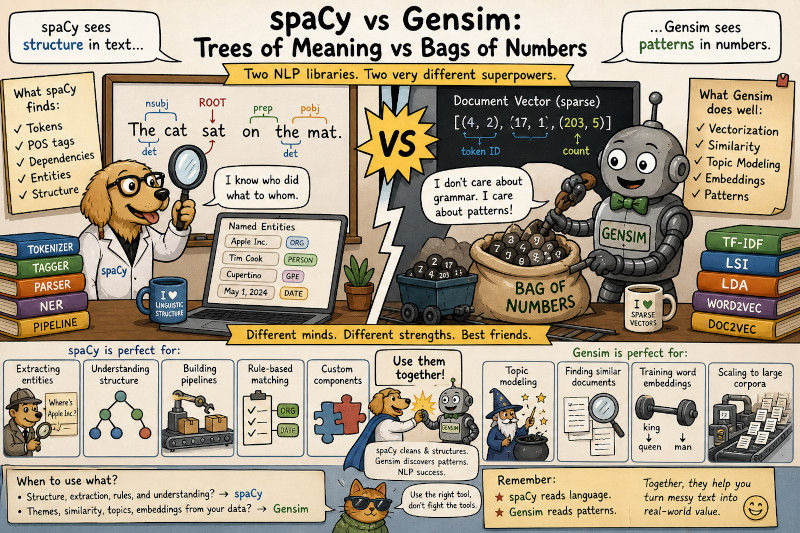
The two libraries complement each other. A good application here is to use spaCy for preprocessing. For example you can use spaCy to eliminate stopwords, punctuation, or numerical components from the list of tokens for each document, and just remember the text of the left overs as a list of text based tokens. Then Gensim can build the dictionary and topics from the cleaned up list of tokens. Basically, spaCy handles linguistic structure and Gensim handles statistical patterns.
The preprocessing step is doing more than lowercasing. It is using linguistic annotations, for example
token.lemma_ collapses related word forms: runs, running, and ran can become run.
token.is_stop removes high-frequency words like the, and, or is.
token.is_punct removes punctuation.
token.is_alpha keeps alphabetic tokens and drops numbers or symbols.
You can make the filter more selective and for example only allow nouns to be used. This is often very useful for topic modeling, since real topics tend to be build around things or objects.
Another common processing step is to take a specific entity, like for example names and replace any whitespaces by '_' to have the name be a single token for processing with Gensim. This can improve topic models and similarity systems because important names stay intact.
If you are building a content recommendation system, you might:
Use spaCy to extract entities and keywords.
Use Gensim to find similar documents based on topics.
Combine entity overlap + topic similarity for ranking.
Use an LLM to summarize the top-ranked documents.
In this sense, the two complement each other very well and work well together with LLM-based applications. Each part can do its own thing well
The Ecosystem: Transformers and Beyond
spaCy integrates with Hugging Face Transformers.
pip install spacy-transformers
python -m spacy download en_core_web_trf
If we now use the following simple example
The transformer models are slower but often more accurate. Use them when precision matters more than speed. A practical decision rule:
Need | Start with |
Fast entity extraction on many documents | en_core_web_sm or en_core_web_md |
Better accuracy and richer vectors | en_core_web_lg |
Highest accuracy inside spaCy’s pipeline style | en_core_web_trf |
Custom domain entities with clear patterns | EntityRuler or Matcher |
Custom domain entities with varied context | Fine-tuned NER |
Semantic search over paragraphs | Sentence Transformers or embedding API |
spaCy also has plugins and tools for:
spacy-lookups-data — additional language lookup tables, often useful for lemmatization.
spacy-streamlit — quick interactive demos.
spacy-transformers — transformer components inside spaCy pipelines.
spaCy projects — reproducible workflows for training and packaging.
Prodigy — Explosion’s annotation tool, often used with spaCy training workflows.
The library is designed to be extendable, so if spaCy is missing a feature you need, there is a good chance that someone has built it as a plugin.
Closing Thoughts
Compared to Gemsin, spaCy is the production workhorse of NLP. It will not win every research benchmark. It will not give you GPT-level generation. But if you need to process 100,000 customer support tickets, extract names from contracts, identify product mentions in reviews, or build a document classifier that ships next week, spaCy is a reasonable first choice.
The mental model is different from Gensim. Where Gensim treats text as vectors in latent space, spaCy treats text as a graph of linguistic relationships. Which one works better for you, depends on the application.
If you need unsupervised clustering and topic discovery, use Gensim. If you need structured extraction and classification, use spaCy. Or use them together if both is needed.
The deeper lesson is that classical NLP still matters. LLMs are powerful, but many production systems still need fast preprocessing, entity extraction, deterministic rules, sentence segmentation, linguistic filters, and explainable document features. spaCy gives you those building blocks in a form that is fast enough to use and structured enough to maintain.

Comments