spaCy: When You Need Structure, Not Just Vectors, Part I

Updated: May 2
As we saw in the previous blog post, Gensim treats documents as bags of numbers. spaCy on the other hand treats them as trees of linguistic facts. We do not really want to answer here which is better, but rather what their different strengths are.
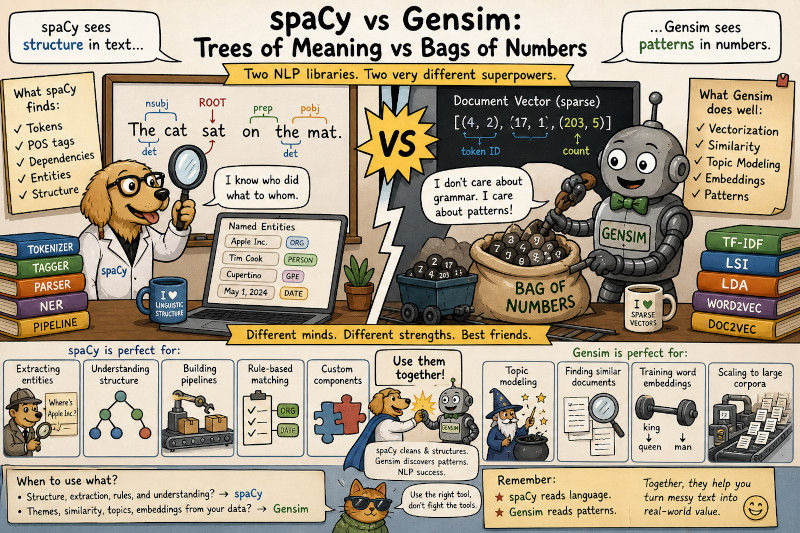
The Basic Framework
spaCy has one core assumption: that language has structure and that structure is computable.
Every sentence can be broken into:
Tokens (words, punctuation)
Parts of speech (noun, verb, adjective)
Dependencies (subject, object, modifier)
Named entities (people, places, organizations)
Where Gensim goes for similarity. spaCy goes for understanding. This is, of course, not meant in the literal sense. spaCy does not “understand” text in the human sense. It does not know what a cat is, or what Apple Inc. does, or whether a sentence is true. What it gives you is structured linguistic information. This includes information like: this token is probably a noun, this phrase is probably a company, this verb is probably the root of the sentence, this noun is probably the subject.
That structure is useful because most real text-processing systems are not just asking “are these two documents similar?” They are asking things like:
Which companies are mentioned in these contracts?
Which support tickets contain a product name and a complaint?
Which sentence says that one company acquired another?
Which nouns are modified by words like urgent, delayed, or failed?
Which documents mention a person, a date, and a monetary amount in the same paragraph?
Those are all structural questions, and vector similarity does not answer them.
The library is built for production, with fast inference, pre-trained models, and industrial-strength pipelines. If Gensim is for researchers clustering papers, spaCy is for engineers building chatbots, search engines, document processing systems, content classifiers, and extraction pipelines.
Worth noting: spaCy is opinionated. There is usually one “spaCy way” to do something. This can be seen as a feature, less choice means faster development. A useful distinction:
Problem | Better first choice |
Find documents with similar themes | Gensim, Sentence Transformers, vector search |
Extract names, dates, products, and organizations | spaCy |
Build topic models | Gensim |
Parse grammatical structure | spaCy |
Train custom word embeddings from a large domain corpus | Gensim |
Build a production NLP preprocessing pipeline | spaCy |
Generate text | An LLM or Hugging Face Transformers |
Before doing anything else, install spaCy and download a language pipeline:
pip install -U spacy
python -m spacy download en_core_web_sm
You can check what spaCy sees in your environment with:
python -m spacy info
python -m spacy validate
spaCy info tells you which spaCy version and pipelines are installed. spaCy validate checks whether your installed pipelines are compatible with your installed spaCy version.
The Basic Example
Start with the simplest possible case. Load a model and process a sentence.
This is the fundamental pipeline.
Raw text
→ tokenization
→ part-of-speech tagging
→ dependency parsing
→ named entity recognition
→ output.
The nlp object is your pipeline, it is a callable that returns a Doc object. The Doc contains tokens, and each token carries annotations. Everything is indexed and cross-referenced.
A slightly richer inspection makes the idea clearer:
Typical output looks like this:
{'text': 'The', 'lemma': 'the', 'pos': 'DET', 'tag': 'DT', 'dep': 'det', 'head': 'cat', 'is_alpha': True, 'is_stop': True}
{'text': 'cat', 'lemma': 'cat', 'pos': 'NOUN', 'tag': 'NN', 'dep': 'nsubj', 'head': 'sat', 'is_alpha': True, 'is_stop': False}
{'text': 'sat', 'lemma': 'sit', 'pos': 'VERB', 'tag': 'VBD', 'dep': 'ROOT', 'head': 'sat', 'is_alpha': True, 'is_stop': False}
{'text': 'on', 'lemma': 'on', 'pos': 'ADP', 'tag': 'IN', 'dep': 'prep', 'head': 'sat', 'is_alpha': True, 'is_stop': True}
{'text': 'the', 'lemma': 'the', 'pos': 'DET', 'tag': 'DT', 'dep': 'det', 'head': 'mat', 'is_alpha': True, 'is_stop': True}
{'text': 'mat', 'lemma': 'mat', 'pos': 'NOUN', 'tag': 'NN', 'dep': 'pobj', 'head': 'on', 'is_alpha': True, 'is_stop': False}
{'text': '.', 'lemma': '.', 'pos': 'PUNCT', 'tag': '.', 'dep': 'punct', 'head': 'sat', 'is_alpha': False, 'is_stop': False}
A few attributes matter immediately:
token.text is the original surface form.
token.lemma_ is the base form, so sat becomes sit.
token.pos_ is the coarse part of speech, such as NOUN, VERB, or ADJ.
token.tag_ is the more detailed part-of-speech tag, such as NN, VBD, or DT.
token.dep_ describes the grammatical relationship to the token’s head.
token.head points to the syntactic parent token.
token.is_stop tells you whether the token is a common stop word.
The underscore has a meaning in the naming. In spaCy, attributes ending in '_' usually return the readable string label. Attributes without '_' often return an integer ID used internally for speed.
Here, one will return the string 'NOUN', the other the ID for noun which is 92. For examples and debugging, we use the string attributes, while for optimized production code, the integer IDs are more efficient.
The architecture: When you call nlp(text), spaCy runs multiple components in sequence. First the tokenizer, then components such as the tagger, parser, lemmatizer, and named entity recognizer add annotations. The models are pre-trained on large corpora, so you get reasonable accuracy out of the box.
You can inspect the pipeline directly:
The exact output depends on the model. A transformer pipeline, for example, will look different from a small statistical pipeline.
You can also disable parts of the pipeline if you do not need them:
This matters especially for production at scale. If you only need tokenization and part-of-speech tags, running the parser and NER is wasted work. spaCy makes it easy to choose the components you actually need.
Instead of loading the pipeline with disabled parts, you can also temporarily disable components inside a block:
Using a context manager we can make sure that the components are only disabled for this one use case and enabled immediately after. That pattern is useful when one part of an application needs full parsing, but another part only needs fast tokenization and tagging.
Named Entity Recognition: The Main Feature
Most NLP pipelines need to extract “things” from text, whether this is people, companies, dates, money. This is precisely what spaCy was made for
The ents property gives you every detected entity. Each entity is a Span, essentially a slice of the document. It has text, a label, token offsets (see below) and character offsets.
The character offsets are easy to overlook, but they are extremely useful. If you are building a document annotation tool, a search result highlighter, or a contract review interface, you need to know where the entity appears in the original string. Looking at more of the positional data
Taking these two readouts together we have
ent.start and ent.end are the token offsets.
ent.start_char and ent.end_char are the character offsets.
ent.label_ is the readable entity type.
This makes it particularly easy to filter entities by type:
This is where spaCy becomes not just practical, but very easy to use. Once entities are structured, it is trivial to count them, group them, store them in a database, or use them as features in a downstream model. Assuming of course that the information you are looking for is one of those features present.
For example, a crude company mention extractor:
What makes this useful: Entity types are consistent, in the cases we already had for example, GPE always means a geopolitical entity, ORG always means an organization, PERSON always means a person. That makes it easy to afterwards filter, count, or extract with confidence.
As for any such models, confidence does not mean certainty. Pre-trained models are not perfect, we obviously chose this example, since “Apple” could be a company or a fruit, it depends on context. Similarly, “Amazon” could be a company, a river, or a region. spaCy uses context but will sometimes guess wrong.
A practical pattern is to combine statistical NER with rules. For example, suppose your company has internal product names that spaCy will never know. You can add an EntityRuler:
This is often easier than training a model. But of course, limited to the case that your extraction need is narrow and predictable, rules are cheaper, more transparent, and easier to debug.
EntityRuler patterns can also use token attributes:
This kind of rule can catch IDs like BUG-1234 or OPS-4421. But this is not a trained model, it is structured pattern matching inside the same pipeline.
The trade-off: Pre-trained NER is excellent for common categories, but domain-specific text needs help. For medical, legal, financial, or internal business text, you will usually need one of three things:
A rule-based layer for known terminology.
A fine-tuned NER model for domain-specific entities.
A hybrid system that uses rules for high-precision cases and ML for broader coverage.
That hybrid approach is often the most practical starting point.
Dependency Parsing: The Hidden Graph
For spaCy, every sentence is a tree. The root is the main verb and everything else attaches to it.
Each token points to its “head”, essentially the word it modifies or depends on. The ROOT token points to itself. This is how spaCy encodes syntax.
You can traverse the tree. For example if we look for the subject of the sentence from the above example and its children:
The children of a token are the tokens directly attached to it. On the other hand, the subtree is larger, it includes the whole phrase below that token, including the token itself:
In this tiny example the distinction is nearly non-existant, but it becomes more pronounced for longer sentences. If you want just the modifiers, use children, while you use the subtree to get the whole phrase related to the token.
You can turn a subtree back into text:
This is a very useful dependency-parsing trick in spaCy, left_edge and right_edge give you the span covered by that token’s syntactic subtree. You also get noun chunks for free:
Noun chunks are base noun phrases, consisting of a noun and all of its modifiers. They are often enough for keyword extraction, entity-adjacent context, or simple document summaries.
A more practical example, useful to understand context: extract who did what to whom.
This is not perfect information extraction, but it shows the power of syntax. You can get beyond keyword matching and start asking structural questions about actions and participants.
Why this matters: Dependency parsing lets you answer questions like:
What is the subject of the sentence?
Which verb describes this entity?
What noun is this adjective modifying?
Is this entity doing the action, or receiving the action?
What prepositional phrases attach to this verb?
This is an essential difference between Gensim and spaCy. While Gensim sees word co-occurrence, spaCy sees grammatical relationships.
The trade-off: Dependency parsing is model-dependent. It is usually good on clean, grammatical prose. It becomes less reliable on fragments, tables, OCR text, code comments, noisy social media text, or bullet-point-heavy documents. If your input text is messy, inspect a sample with displaCy, a visualization tool to inspect grammatical relationships, before building rules around dependency labels.
Rule-Based Matching: Patterns Without ML
Sometimes you do not need a neural network, you need a version of regex, but instead of looking for characters, you look for linguistic structure and patterns.
This is where spaCy’s Matcher comes in. It lets you define patterns using token attributes.
This example reveals an important detail: the matcher finds token sequences, not necessarily linguistically complete phrases. Then 'brown fox' and 'lazy dog' match because it is adjective + noun. Note that it only checks for adjective + noun next to each other. You cannot tell it to skip 'brown' to obtain 'quick fox' for example. The best one could do when using Matcher is
pattern = [{"POS": "ADJ", "OP": "+"}, {"POS": "NOUN"}] Which would result in the matches 'quick brown fox' and 'brown fox', in addition to 'lazy dog'. We go into some extra detail about such constructions below. If you want full noun phrases, doc.noun_chunks is often better, while Matcher is better for precise token patterns.
You can combine multiple attributes:
Token patterns can use attributes such as:
TEXT — exact token text.
LOWER — lowercase token text.
LEMMA — base form.
POS — coarse part of speech.
TAG — fine-grained part-of-speech tag.
DEP — dependency label.
ENT_TYPE — named entity type.
IS_ALPHA, IS_DIGIT, IS_PUNCT, IS_STOP — boolean token flags.
SHAPE — rough character shape, such as Xxxx, dd, or dddd.
You can also use operators. These are the part that makes the matcher feel like regex for tokens:
Common OP values:
? — optional, zero or one match.
* — zero or more matches.
+ — one or more matches.
! — require that the token does not match.
For example:
You can also use set membership:
And regular expressions:
For long lists of exact phrases, use PhraseMatcher, not Matcher:
PhraseMatcher is better when you already know the phrases you care about. Matcher is better when you care about linguistic shapes.
There is also DependencyMatcher, which matches dependency-tree patterns instead of flat token sequences. That is useful when word order varies but grammar remains similar. For example going back to our original Matcher example
The use case: When you need to extract structured information and you do not want to train a new model. If you need to find all “X acquired Y” patterns in press releases, write a matcher. If you need to classify documents by the presence of certain phrase structures, write a matcher. If you need to catch internal product names, error codes, or compliance phrases, then a ruler might do the job.
Combining with machine learning: Even for tasks that might need a supervised learning model to work in edge cases, it can be a good idea to use matchers to get rid of the well structured cases first.
The reason is not just simplicity. It is also debuggability. When a rule or matcher fails, you can inspect the pattern. When a model fails, you need training examples, error analysis, and retraining.
To Be Continued...
We continue this in the next post with the more specialized features, like custom pipelines and models.

Comments